
Approval workflow of timesheet
Approval workflow of timesheet in a few steps: Submit Approve/Reject Lock/Unlock The process of submitting the hours has been explained in details here. After the hours have been submitted, depending on how the project has been set, logged hours can … Continued
Submitting hours on projects
How to submit hours on projects Every user can submit hours easily, just go to “Timesheet”, from menu, and then on “Submit” tab. The view of the timesheet is per week and you can easily navigate from one week to … Continued
Customize your account
The default settings of your account In elapseit, we are proud to say that, you can custom your data as much as you want! That is why, in this article I`ll show you how to customize your account with data that can … Continued
How to add People
How to add a new person Adding new people, together with adding Clients and Projects, is one of the first steps to be able to work with elapseit. You can either import all the information, if there are more than … Continued
Adding a new project
How to add a new project Adding a project is a pretty simple but very important step. You can either import all the information, check here how, or you can follow the next steps: Go to Management section from menu. Click on the Add button … Continued
Archiving and deleting Clients
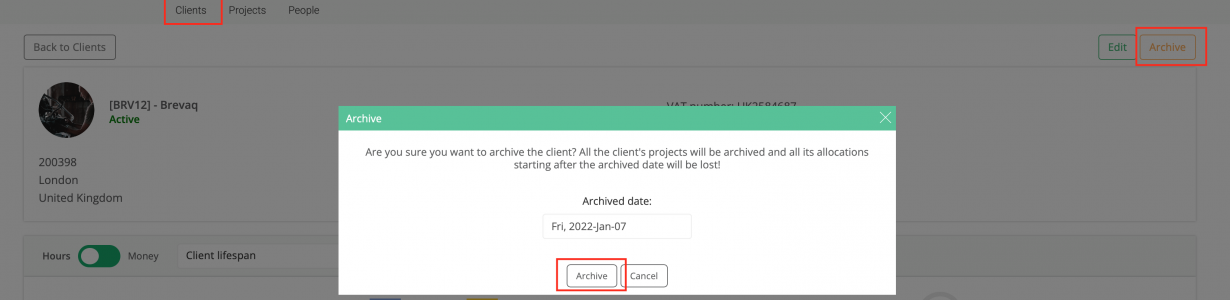
Archive a Client Go to “Management” section. Click on “Clients” view. Use the “Search” box from left sidebar to find the Client that you want to archive. Click on the Client, to open the page so you can edit it. … Continued
Create a free Client account
Give access to your elapseit account to your clients and share information directly Giving access to your clients, in elapseit, depends only on you; what information you share with them can vary from one client to another. So, here … Continued
Setup notification for project
With elapseit you can manage the email notifications for each project or you can set notifications that will apply to all projects, by using Set as Global feature. You can go even more in details and for each notification you can … Continued